Desertcart purchases this item on your behalf and handles shipping, customs, and support to Barbados.
⏳ Take control of your time, twice as smart!
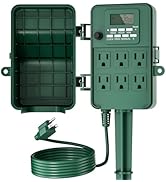
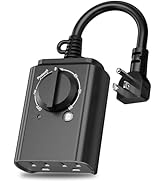
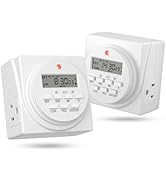
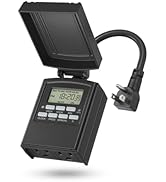
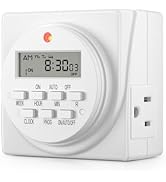
The Century Timer 7 Day Digital Programmable Timer features dual grounded outlets with independent scheduling, supporting up to 8 on/off cycles daily. It operates at 125VAC, 15A, 1725W with a clear LCD display and battery backup to protect your settings during power failures. UL approved and ideal for hydroponic systems or precise home automation.


| ASIN | B00MVF16JG |
| Best Sellers Rank | #308,234 in Home Improvement ( See Top 100 in Home Improvement ) #410 in Wall Timer Switches |
| Brand | BN-LINK |
| Colour | black |
| Customer Reviews | 4.4 out of 5 stars 25,594 Reviews |
| Item Type Name | timer |
| Item Weight | 227 g |
| Manufacturer | lifetime |
| Manufacturer Part Number | FD-60/U6 |
| Model number | FD-60/U6 |
| Net Quantity | 1.0 Count |
| Number of settings | 8 |
| UPC | 746264393471 680474115587 |
| Unit Count | 1.0 Count |
A**R
Great
Great
E**E
I still love it after two years. It's well designed and relatively easy to set up
Two Year Update: After a little over two years, I still love this timer. It's worked flawlessly and has been a night-and-day improvement over the analog timers I used to use. I use it for setting a radiator-style space heater to run in the evening and early morning. Unlike the analog timers I formerly used, I never have to correct the time and I never have to worry about bumping it and changing the programming inadvertently. The main potential problem is that how to program it is not obvious. I keep the original instructions handy for when I want to change the schedule. It's not a big problem. After you've learned to program it initially, changing the programming is pretty easy, but it helps to have the instructions as a reminder. Overall this is a great timer that I recommend highly. Original Review From Two Years Ago: I’ve only had the timer for a day, so I can’t attest to its reliability yet, but I am impressed with how much of an improvement it is over the mechanical timers I’ve used for years. Set up is fairly easy, however many people may be confused by the setup and programming instructions, so here is how I did it. Setup ===== Follow the instructions to initially set the day and time. Be sure to set it to standard time even if you’re currently on daylight savings time. If you’re currently on daylight savings time, then after you set the time, press the HOUR and MIN buttons simultaneously. The time will automatically advance an hour for daylight savings time. In the fall, to return to standard time, press HOUR and MIN again to set the timer to standard time. Programming ========== This is the part that will confuse a lot of people. Here’s how I did it. There are 8 program settings, each of them with a separate ON-OFF setting. Each time you press the PROG button, it will advance. The first time you press PROG, it displays 1ON (1 + ON in smaller, raised letters). The second time you press PROG, it displays 1OFF, the third time it displays 2ON, the fourth time 2OFF, etc. The programming steps are: 1. If 1ON isn’t displaying, press PROG until you get to 1ON. (1 + ON in smaller, raised letters) 2. Press WEEK. You’ll see all seven days display. If you want the timer to turn on all seven days, then just go to step #3, otherwise press WEEK again until the days you want are displayed. 3. Press HOUR until the hour you want the timer to turn on is displayed 4. Press MIN until the minute you want the timer to turn on is displayed 5. Press PROG once. It will now advance to 1OFF. 6. Repeat steps 2 - 4 for the day, hour, and minute you want the timer to turn off. 7. If you want to set another day and time for the timer to turn on and off, press PROG once and then repeat steps 2-6. Continue this process until you’ve set up to eight day-time combinations for the timer to turn on and off. 8. To activate the programs you’ve just set, press ON/AUTO/OFF twice. It should now display AUTO. In the future, if you want to override the programming and force the timer to be either on or off all the time, press the ON/AUTO/OFF button until either ON or OFF displays. A red light on the timer will turn on whenever the timer is on. The light goes off when the timer turns off automatically or when you turn it off manually by pressing ON/AUTO/OFF. CAUTION about using this with a space heater ==================================== I’ve used 1500 watt space heaters on timers for decades, but YOU HAVE TO BE CAREFUL! Make sure the timer is rated for more than the wattage of the heater. This timer is rated for more than 1500 watts, so theoretically it is safe, but it nonetheless can still start a fire if you don’t take precautions (and even if you do take precautions). 1. Never plug the timer into an extension strip or surge protector if you’re using for a heater. 2. Never plug the timer into an extension cord that isn’t rated at least for the heater. 3. Try to avoid running the heater at full 1500 watts. It’s easier for me to follow this rule because I don’t experience extreme cold weather where I live. On the rare occasions when I do run the heater a the full 1500 watts, I don’t leave it unattended. 4. Periodically unplug the heater and examine the plug. Over time, the heater’s plug may deteriorate. I’ve thrown out several heaters when they’ve reached this point. Last week I threw out both my 30 year old oil-filled radiator heater and my last timer because the heater’s plug showed signs of deterioration and had visibly damaged the socket in the the timer. The timer still worked, but would have been unsafe to use. I’ve seen two forms of plug deterioration: the plug’s smooth plastic surface becoming rough around the metal prongs, and the metal prongs themselves showing signs of beginning to disintegrate. So far I'm really impressed with this timer. If something happens to lower my star rating, I'll update this review.
J**N
Excelente producto
Funciona perfectamente, justo lo que buscaba y es muy fácil de programar¡!
P**.
3RD review:They replaced the lemon works great! AND refunded my $! 2nd 4 star for Customer Service, 1ST review, product garbage.
This is the 3RD and final review. This company actually looks at reviews and strives to get 4 or better yet 5 stars. I think 5 stars is fair at this time. They appeared to bend over backwards. Once I received the replacement I tested it several times and it is functioning. 5 stars to customer service. I thanked them for compensating me for the trouble I had. Customer service programmed it well for me. The other one was a lemon. It happens. They do need to improve quality assurance and directions in the manual before sending it to market. At least with light I can see the tiny printed week days. The manual operating light timers are much easier to use. Not as much detail to remember. Once one learns to use the electronic timer, there are multiple options one can program it for. Not going to concern myself with that at this time. In summary: Thank you Customer service for your help. Other companies could learn from you folks. I do feel cared about as their customer. A+. I just fired a doctor today for lousy care & service. He could learn some lessons from these folks about respect, showing concern and truly being helpful! That says a lot about Century Products costumer service! 2ND review 4 stars because of Customer Service [cs]. Spoke to Victoria of CS. She talked me through entire procedure start to finish assuring it would turn light on next morning 1/10/2018 @ 5 am and off @ 6 am. Told her instruction manual is terrible for ME to understand. She said company working on improving them with customer feedback. She asked me to please give a higher star for this assistance. As of 1/11/2018 I'm giving 4 stars for excellent customer service. Not 5 because of aggravation I've had up to now. [When light didn't activate I over slept almost missing ride to work and did miss Doctors appointment!]. Victoria walked me through programing and if it still didn't work, she offered the option in making amends:full refund and "E cycle" toss appliance out & get replacement no charges and get refund if still didn't work. She said she will call back 1/11/18 on status-did light turn on? Light did NOT turn on. Another offer proposed: Before they ship it out they will quality assure checking programing correctly (which I had done b4 BTW) and set the timer for me. Without further thought I agreed. Now if it does work consistently I will certainly give a 5 star rating for excellent product and customer service. If it doesn't work, I'll give 1 star saying I'd prefer zero stars. Lousy product and manipulative CS. Stay tune for follow up. Hope these reviews help. I combined them. I Hope I didn't make a mistake accepting this alternative offer, given other complaints I had. If still doesn't work, will speak to supervisor and demand refund never getting this Century brand again! They take ratings seriously- good! 1st review one star- it didn't work. The reviews were great so I took a big chance.The digital print of the week days is too small to see comfortably. When programming, the internal battery must be charged for at least 30 minutes. It has to be unplugged from wall socket and must not have anything plugged into it either while programming it. The red light that indicates it is "automatically" programmed to turn itself on and off is very dim. Countless times it has not turned on itself as I had programmed it to do. I even tested it and it worked but not when needed! The instruction booklet for me seemed easy until I couldn't get product to work. But in fact they are VERY confusing. Can't suggest this product. Sorry... Not dependable regardless of MY testing. Tried trouble shooting, switching electrical outlets etc. Infuriating!
M**S
Excelente Apoyo para iluminación programada en Casa.
Buen Producto, de uso y programación sencilla, con la ventaja de que si se va la luz, no piede la programación por contar con bateria interna recargable con el uso diario.
O**.
Awesome flexibility but little complicated
I was thinking I need something to restart Internet every so often as I’m tired of my smart home, turning into a dummy when the Internet goes down and then I can’t operate some lights and my air conditioning and it just is a hassle to get up and put on your screws and go out into the garage because mine is full lol and go unplug this thing and then put plug it back in. Then I’m good for however, long. I fear there has to be a way to automate this so it can restart itself every so often and whatever it needs to do when it restarts - so many choices on the web or very complicated to me as far as router restart and I figured there had to be something like this like a time that you use for your Christmas lights or something it maybe it goes on and off a few times while you’re sleeping or while you’re away at work and takes out the garbage or whatever it has to do when it starts. this looked perfect. It looks like it has a lot of ways you can program it a lot of flexibility some of it is a little bit tedious and a little bit complicated to screw up with the wrong schedule, but that doesn’t mean the device has any problems. Just means I need to pay more attention when I’m programming it. That’s why it’s sitting in the box after I played with it for a little while because I couldn’t get it all done and that’s my problem at this device not the device problem. I think if I can get set up this is perfect.
Trustpilot
2 months ago
1 week ago